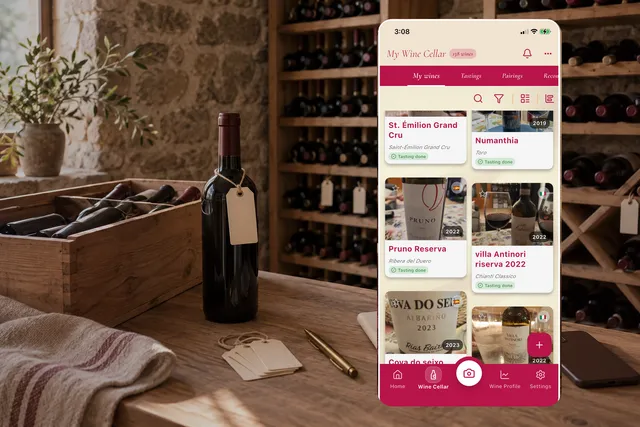
More clarity for understanding your cellar
Enolisa’s stock management is part of the personal cellar as a complete system for following what really happens to each wine inside your collection.
Many wine apps help you save labels, remember bottles, or keep your collection tidy. A bigger upgrade happens when that same collection helps you understand what you still own, what you already drank, what you gave away, and how each wine changed over time.
That is what Enolisa covers today. Your cellar becomes a more practical inventory with clearer tracking and enough context to be useful beyond a simple saved list.
If you are coming from broader pages about how Enolisa’s digital cellar works, Enolisa analytics, or how to add wines to your cellar, this update is the layer that connects raw inventory, movement tracking, and a faster operational view of your collection.
The common challenge: memory is not enough
As your collection grows, the questions become more specific:
- How many bottles of this wine do I actually still have?
- Did I drink it, or did I gift it?
- Did I have more units a few months ago?
- Am I losing track of what comes in and out of my cellar?
The issue is not only quantity. It is context. If a cellar cannot clearly reflect movement, you end up with an incomplete picture: you know a wine passed through your collection, but you cannot tell what really happened to it.
An inventory with fuller context
Enolisa’s new stock management organizes each wine with a simple model that is easy to read:
- Total bottles: everything you have ever had for that wine.
- Bottles in cellar: what is still physically with you.
- Consumed bottles: what you already opened or drank.
- Gifted bottles: what left your cellar because you gave it to someone else.
This changes the usefulness of the wine detail. You are no longer just seeing a remaining number. You are seeing the story of that wine inside your cellar.
If you bought six bottles, drank two, and gifted one, you keep the context. You still know that wine has had a clear place in your collection, and you also know that three bottles are still with you.
Update stock directly from the wine detail
A key part of the system is that you can adjust stock directly from the wine’s detail page. That makes stock control feel much more natural.
You do not need to leave the wine view, remember numbers elsewhere, or turn inventory updates into a chore. You are already looking at the wine, so you can correct its status in the same flow.
That matters because stock control is only useful when keeping it current is easy. When updating takes seconds, your cellar stays alive. When it feels annoying, the inventory becomes outdated and loses value.
The flow combines a more guided stock editor that makes it easier to distribute units between what is still in cellar, what has been consumed, and what left as a gift.
And for the most common everyday action, when you simply opened a bottle and want to reflect it quickly, there is also a quick consume action directly from the wine detail. That lowers friction and makes it much more realistic to keep stock aligned with real life.
This product detail matters: Enolisa does not force users into a deep control flow every time. Stock management is designed so the user can resolve the most common case in seconds and only go deeper when more precision, context, and flexibility are actually useful.
A dedicated stock control with visual audit
Enolisa’s stock control includes a visual audit of changes. In practice, that means stock movement does not become a black box.
The goal is not to add friction. It is to add traceability. When you adjust units, you can review what changed more clearly. That reduces mistakes, avoids confusion, and makes stock management more accurate and reliable.
That visibility goes beyond one isolated update. You can review the stock traceability of that wine through a visual history of changes and add optional notes whenever you want to preserve more context around a correction, a consumed bottle, or a gifted bottle.
For the user, the benefit is simple: it is not just a number changing. The context of that change is easier to follow.
What Enolisa’s stock control can do today
In practical terms, Enolisa’s stock control now lets you:
- separate total bottles, bottles in cellar, consumed bottles, and gifted bottles;
- update stock directly from the wine detail, without leaving that wine’s context;
- use a more guided control to distribute units more safely;
- mark one bottle as consumed through a quick action when you do not need the full workflow;
- review a visual stock history;
- add optional notes to stock movements for more context;
- open a quick cellar summary to understand availability and movement;
- read recent activity and consumption analytics to understand how your collection is evolving.
This matters because stock control becomes more than a number. The cellar starts behaving like an inventory with memory, traceability, and usable context.
It also makes one thing clear: Enolisa covers two different needs inside the same stock system. There is a fast, tactical layer for everyday use, and a more advanced layer for users who want to fine-tune unit distribution, review movements, preserve notes, and better understand how the cellar is moving over time.
A quick summary for understanding your cellar at a glance
The cellar includes a quick stock summary with fast metrics. This matters because a useful cellar is not only checked wine by wine. Sometimes you need a broader reading of your collection.
That summary helps you understand:
- how much stock you still keep,
- how much has already been consumed,
- how much movement there is in your cellar,
- and how your inventory evolves without reviewing every single wine.
It is built for everyday use. Instead of opening multiple wine details and rebuilding the picture in your head, the cellar gives you a faster and more actionable overview.
That overview is now richer than a static stock total. Enolisa also adds a clearer reading of recent registrations, consumption behavior, and time windows such as year-to-date activity. If you want the wider context around that layer, it also fits naturally with the article about Enolisa analytics.
That means stock management is not only about correcting counts. It also helps users interpret the collection better: when it rotates more, what is still physically there, how much has already been consumed, and when a fast action is enough versus when a fuller review gives more value.
What changes in day-to-day use
This feature becomes especially valuable in everyday situations:
- Before buying, you can check more reliably whether you still have bottles left.
- After a dinner or tasting, you can register what was consumed without losing history.
- If you gift a bottle, the inventory still makes sense and does not mix that action with your own consumption.
- When you review your collection weeks later, you can quickly understand which wines stay, which wines rotate, and which ones already left.
On paper, the difference may sound subtle. In practice, it changes how useful the cellar feels. You stop using it only to remember wine names and start using it to manage your collection with traceability and a clearer view of what is actually happening inside it.
A cellar with memory and context
Real stock management turns Enolisa’s personal cellar into something more valuable: a tool with memory.
It does not just tell you that a wine was once registered. It helps you preserve the context of each bottle, separate what is still with you from what already passed through your cellar, and keep more context around drinking, replacing, or gifting.
In other words, Enolisa’s cellar now covers context, traceability, quick consumption, and a broader operational view of your collection inside one integrated stock system.
If you want the broader picture around this feature, these pages also connect well: